

iOS Agent SDK 最后更新时间: 2026年10月16日
一、概述
Agent SDK 是高德地图提供的智能语音助手SDK,支持自然语言查询、路线规划、POI搜索、导航控制等功能。SDK提供了完整的语音交互能力,可以集成到第三方应用中,为用户提供智能化的地图服务体验。
二、主要功能
- 智能查询: 支持自然语言查询,如"去西藏"、"附近的肯德基"等
- 路线规划: 支持驾车、骑行、步行多种出行方式的路线规划
- POI搜索: 支持地点搜索和选择
- 导航控制: 支持开始导航、停止导航、切换路线等操作
- 导航数据监听: 通过addNaviDataListener API实时获取导航过程中的各种数据更新
- 行中功能: 支持导航过程中的途经点添加、终点修改、顺路搜索等
- 多链路支持: 支持SDK链路和高德APP链路两种模式
三、系统要求
- iOS 11.0 及以上版本
- 需要集成高德地图SDK相关组件
四、快速集成
4.1 添加依赖
在项目的添加MALLMKit.a依赖
4.2 导入头文件
#import <MALLMKit/AMapAgentClientManager.h>
#import <MALLMKit/AMapNaviClientManager.h>
#import <MALLMKit/AMapLinkManager.h>
#import <MALLMKit/AMapAuthorizationManager.h>
4.3 基础配置
4.3.1 初始化Agent
// 设置命令发送目标(SDK链路或APP链路)
[AMapAgentClientManager shareInstance].commandDestination = AMapAgentCommandDestinationSDK;

// 设置查询结果回调
[[AMapAgentClientManager shareInstance] setQueryResultCallback:^(AMapAgentQueryResult * _Nonnull queryResult) {
    NSLog(@"查询结果: %@", queryResult.summary);
    // 处理查询结果
    [self handleQueryResult:queryResult];
}];

// 重置Agent场景
[[AMapAgentClientManager shareInstance] resetAgentScene:@"home"];
4.3.2 初始化Navi
// 配置导航环境
AMapNaviEnv *env = [AMapNaviEnv new];

// 设置家和公司位置
AMapAgentPOI *homeLocation = [AMapAgentPOI new];
homeLocation.name = @"我的家";
homeLocation.coordinate = CLLocationCoordinate2DMake(39.908823, 116.397470);
homeLocation.uid = @"HOME_POI_ID";
env.homeLocation = homeLocation;

AMapAgentPOI *workLocation = [AMapAgentPOI new];
workLocation.name = @"我的公司";
workLocation.coordinate = CLLocationCoordinate2DMake(39.918823, 116.407470);
workLocation.uid = @"WORK_POI_ID";
env.workLocation = workLocation;

// 设置导航类型和偏好
env.amapNaviType = AMapNaviTypeDrive;
env.multipleRoute = YES;
env.avoidCongestion = NO;
env.avoidHighway = NO;
env.avoidCost = NO;

[AMapNaviClientManager shareInstance].amapNaviEnv = env;

// 设置导航数据监听
[[AMapNaviClientManager shareInstance] addNaviDataListener:^(AMapNaviPbData * _Nonnull navidata) {
    // 处理导航数据
    [self handleNaviData:navidata];
}];
4.3.3 初始化IPCLink(APP链路模式)
// 如果使用APP链路,需要初始化链接管理器
AMapLinkConnectConfig *config = [AMapLinkConnectConfig defaultConfig];
config.autoReconnect = YES;
config.maxReconnectAttempts = 5;
config.reconnectDelay = 2.0;

[[AMapLinkManager sharedInstance] initWithConnectConfig:config];
[[AMapLinkManager sharedInstance] connect];

// 监听连接状态
[[AMapLinkManager sharedInstance] addReachablityChanged:^(BOOL isReachablity) {
    NSLog(@"连接状态: %@", isReachablity ? @"已连接" : @"已断开");
}];
五、核心API使用
5.1 智能查询
5.1.1 基础查询
- (void)performQuery:(NSString *)queryText {
    AMapAgentQueryParam *param = [AMapAgentQueryParam new];
    param.queryText = queryText;

    NSString *sessionId = [[AMapAgentClientManager shareInstance] query:param];
    NSLog(@"查询会话ID: %@", sessionId);
}

// 使用示例
[self performQuery:@"去西藏"];
[self performQuery:@"附近的肯德基"];
[self performQuery:@"开车去颐和园需要多久"];
5.1.2 多轮对话查询
- (void)performFollowUpQuery:(NSString *)queryText withPreviousResult:(AMapAgentQueryResult *)previousResult {
    AMapAgentQueryParam *param = [AMapAgentQueryParam new];
    param.queryText = queryText;
    param.selectedObject = previousResult.resultObj;
    param.lastActionType = previousResult.actionType;

    NSString *sessionId = [[AMapAgentClientManager shareInstance] query:param];
    NSLog(@"追加查询会话ID: %@", sessionId);
}

// 使用示例:在搜索结果基础上进行选择
[self performFollowUpQuery:@"第一个" withPreviousResult:self.lastQueryResult];
5.2 query结果处理
- (void)handleQueryResult:(AMapAgentQueryResult *)queryResult {
    switch (queryResult.actionType) {
        case AMapAgentQueryResultActionTypeRequestRoute:
            [self handleRouteRequest:queryResult];
            break;
        case AMapAgentQueryResultActionTypeSearchPoi:
            [self handlePOISearch:queryResult];
            break;
        case AMapAgentQueryResultActionTypeRouteSearch:
            [self handleRouteSearch:queryResult];
            break;
        case AMapAgentQueryResultActionTypeExitNavi:
            [self handleExitNavi:queryResult];
            break;
        default:
            NSLog(@"未处理的操作类型: %ld", (long)queryResult.actionType);
            break;
    }
}

- (void)handleRouteRequest:(AMapAgentQueryResult *)queryResult {
    if (queryResult.resultObj) {
        // 路线数据结构: NSDictionary<NSNumber *, AMapNaviRoute *>
        NSDictionary *routes = queryResult.resultObj;
        NSLog(@"获得路线数量: %lu", (unsigned long)routes.count);

        // 开始导航
        [self startNavigationWithRoutes:routes];
    }
}

- (void)handlePOISearch:(AMapAgentQueryResult *)queryResult {
    if ([queryResult.resultObj isKindOfClass:[AMapPOIResult class]]) {
        AMapPOIResult *poiResult = queryResult.resultObj;
        NSLog(@"搜索到POI数量: %lu", (unsigned long)poiResult.poiItemArray.count);

        // 保存搜索结果供后续使用
        self.currentPOIResult = poiResult;
    }
}
5.3 导航控制
5.3.1 开始导航
- (void)startNavigationWithRoutes:(NSDictionary *)routes {
    // 根据导航类型选择对应的管理器
    AMapNaviType naviType = [AMapNaviClientManager shareInstance].naviType;

    switch (naviType) {
        case AMapNaviTypeDrive:
            [[AMapNaviDriveManager sharedInstance] setIsUseInternalTTS:YES];
            [[AMapNaviDriveManager sharedInstance] selectNaviRouteWithRouteID:0];
            [[AMapNaviDriveManager sharedInstance] startEmulatorNavi]; //这个是模拟,真机应选gps
            break;
        case AMapNaviTypeRide:
            [[AMapNaviRideManager sharedInstance] setIsUseInternalTTS:YES];
            [[AMapNaviRideManager sharedInstance] selectNaviRouteWithRouteID:0];
            [[AMapNaviRideManager sharedInstance] startEmulatorNavi];
            break;
        case AMapNaviTypeWalk:
            [[AMapNaviWalkManager sharedInstance] setIsUseInternalTTS:YES];
            [[AMapNaviWalkManager sharedInstance] selectNaviRouteWithRouteID:0];
            [[AMapNaviWalkManager sharedInstance] startEmulatorNavi];
            break;
    }
}
5.3.2 停止导航
- (void)stopNavigation {
    [[AMapNaviClientManager shareInstance] stopNavi];
}
5.3.3 切换路线
- (void)switchToRoute:(NSInteger)routeID {
    [[AMapNaviClientManager shareInstance] switchRoute:routeID];
}
5.3.4 设置播报模式
- (void)setBroadcastMode:(int)mode {
    // mode: 0-静音, 1-简洁播报, 2-详细播报, 6-极简播报, 7-智能播报
    [[AMapNaviClientManager shareInstance] switchBroadcastMode:mode];
}
5.4 导航视图管理
5.4.1 创建导航视图
⚠️ 重要提示:不同导航类型必须使用对应的导航视图和管理器,否则会导致编译错误或运行时崩溃。
驾车导航视图示例:
(void)setupDriveNavigationView {
 // 创建驾车导航视图
 AMapNaviDriveView *driveView = [[AMapNaviDriveView alloc] initWithFrame:self.view.bounds];
 driveView.delegate = self;
 [self.view addSubview:driveView];
// 设置导航视图到客户端管理器
 [[AMapNaviClientManager shareInstance] setAmapNaviView:driveView];
// 添加数据代理(注意:必须使用 AMapNaviDriveManager)
 [[AMapNaviDriveManager sharedInstance] addDataRepresentative:driveView];
// 设置导航类型(注意:是 AMapNaviTypeDrive
 [AMapNaviClientManager shareInstance].naviType = AMapNaviTypeDrive;
 [AMapNaviClientManager shareInstance].amapNaviEnv.amapNaviType = AMapNaviTypeDrive;
}
骑行导航视图示例:
(void)setupRideNavigationView {
 // 创建骑行导航视图(注意:必须使用 AMapNaviRideView,不能使用 AMapNaviDriveView)
 AMapNaviRideView *rideView = [[AMapNaviRideView alloc] initWithFrame:self.view.bounds];
 rideView.delegate = self;
 [self.view addSubview:rideView];
// 设置导航视图到客户端管理器
 [[AMapNaviClientManager shareInstance] setAmapNaviView:rideView];
// 添加数据代理(注意:必须使用 AMapNaviRideManager)
 [[AMapNaviRideManager sharedInstance] addDataRepresentative:rideView];
// 设置导航类型
 [AMapNaviClientManager shareInstance].naviType = AMapNaviTypeRide;
 [AMapNaviClientManager shareInstance].amapNaviEnv.amapNaviType = AMapNaviTypeRide;
}
步行导航视图示例:
(void)setupWalkNavigationView {
 // 创建步行导航视图(注意:必须使用 AMapNaviWalkView,不能使用 AMapNaviDriveView)
 AMapNaviWalkView *walkView = [[AMapNaviWalkView alloc] initWithFrame:self.view.bounds];
 walkView.delegate = self;
 [self.view addSubview:walkView];
// 设置导航视图到客户端管理器
 [[AMapNaviClientManager shareInstance] setAmapNaviView:walkView];
// 添加数据代理(注意:必须使用 AMapNaviWalkManager)
 [[AMapNaviWalkManager sharedInstance] addDataRepresentative:walkView];
// 设置导航类型
 [AMapNaviClientManager shareInstance].naviType = AMapNaviTypeWalk;
 [AMapNaviClientManager shareInstance].amapNaviEnv.amapNaviType = AMapNaviTypeWalk;
}
根据导航类型动态创建视图的通用方法:
(UIView *)setupNavigationViewWithType:(AMapNaviType)naviType {
 UIView *naviView = nil;
switch (naviType) {
 case AMapNaviTypeDrive: {
 AMapNaviDriveView *driveView = [[AMapNaviDriveView alloc] initWithFrame:self.view.bounds];
 driveView.delegate = self;
 [[AMapNaviDriveManager sharedInstance] addDataRepresentative:driveView];
 naviView = driveView;
 break;
 }
 case AMapNaviTypeRide: {
 AMapNaviRideView *rideView = [[AMapNaviRideView alloc] initWithFrame:self.view.bounds];
 rideView.delegate = self;
 [[AMapNaviRideManager sharedInstance] addDataRepresentative:rideView];
 naviView = rideView;
 break;
 }
 case AMapNaviTypeWalk: {
 AMapNaviWalkView *walkView = [[AMapNaviWalkView alloc] initWithFrame:self.view.bounds];
 walkView.delegate = self;
 [[AMapNaviWalkManager sharedInstance] addDataRepresentative:walkView];
 naviView = walkView;
 break;
 }
 }
if (naviView) {
 [self.view addSubview:naviView];
 [[AMapNaviClientManager shareInstance] setAmapNaviView:(id)naviView];
 [AMapNaviClientManager shareInstance].naviType = naviType;
 [AMapNaviClientManager shareInstance].amapNaviEnv.amapNaviType = naviType;
 }
return naviView;
}
5.4.2 切换导航视图
切换导航类型时,必须同时切换导航视图和导航管理器,否则会导致数据不匹配或崩溃。
(void)switchNavigationViewToType:(AMapNaviType)newNaviType {
 // 1. 移除旧的导航视图
 [self.currentNaviView removeFromSuperview];
// 2. 创建新的导航视图(会自动设置对应的管理器和类型)
 self.currentNaviView = [self setupNavigationViewWithType:newNaviType];
}
5.4.3 agent sdk直接使用导航能力
直接设置起点终点设置导航能力,导航数据支持投屏到 rtos sdk
5.5 导航数据监听 (addNaviDataListener API)
addNaviDataListener 是Agent SDK的核心API之一,用于实时监听导航过程中的各种数据更新,包括路线计算、导航信息更新、播报信息等。
5.5.1 基础使用
@property (nonatomic, copy) NaviDataCallback naviDataCallback;

- (void)setupNaviDataListener {
    // 创建导航数据回调
    self.naviDataCallback = ^(AMapNaviPbData * _Nonnull navidata) {
        [self handleNaviData:navidata];
    };

    // 添加导航数据监听器
    [[AMapNaviClientManager shareInstance] addNaviDataListener:self.naviDataCallback];
}
5.5.2 导航数据类型处理
- (void)handleNaviData:(AMapNaviPbData *)naviData {
    NSLog(@"收到导航数据,类型: %ld, 数据源: %ld, 数据长度: %lu",
          (long)naviData.type, (long)naviData.source, (unsigned long)naviData.data.length);

    switch (naviData.type) {
        case AMapNaviDataTypeCalcSuccess:
            NSLog(@"算路成功");
            break;
        case AMapNaviDataTypeUpdateRouteGroup:
            NSLog(@"路线数据更新");
            [self handleRouteGroupUpdate:naviData];
            break;
        case AMapNaviDataTypeCalcFailed:
            NSLog(@"算路失败");
            break;
        case AMapNaviDataTypeUpdateNaviInfo:
            NSLog(@"行中导航信息更新");
            [self handleNaviInfoUpdate:naviData];
            break;
        case AMapNaviDataTypeStartNavi:
            NSLog(@"开始导航");
            [self handleStartNavi:naviData];
            break;
        case AMapNaviDataTypePlayNaviSound:
            NSLog(@"播报导航信息");
            [self handleNaviSound:naviData];
            break;
        case AMapNaviDataTypeArrivedWayPoint:
            NSLog(@"到达途经点");
            break;
        case AMapNaviDataTypeArrivedDestination:
            NSLog(@"到达目的地");
            [self handleArrivedDestination:naviData];
            break;
        case AMapNaviDataTypeStopNavi:
            NSLog(@"结束导航");
            [self handleStopNavi:naviData];
            break;
        case AMapNaviDataTypeHighLightChanged:
            NSLog(@"高亮路线变更");
            [self handleHighLightChanged:naviData];
            break;
        case AMapNaviDataTypeShowLaneInfo:
            NSLog(@"显示车道线数据");
            break;
        case AMapNaviDataTypeHideLaneInfo:
            NSLog(@"隐藏车道线数据");
            break;
        case AMapNaviDataTypeUpdateNaviLocation:
            NSLog(@"定位信息更新");
            break;
        case AMapNaviDataTypeTrackingModeInfo:
            NSLog(@"跟随模式信息");
            break;
        default:
            NSLog(@"其他导航数据类型: %ld", (long)naviData.type);
            break;
    }
}
5.5.3 具体数据处理示例
- (void)handleRouteGroupUpdate:(AMapNaviPbData *)naviData {
    // 路线数据更新,可以解析PB数据获取具体路线信息
    NSLog(@"路线组数据更新,数据长度: %lu", (unsigned long)naviData.data.length);
    // 这里可以根据需要处理PB数据
}

- (void)handleNaviInfoUpdate:(AMapNaviPbData *)naviData {
    // 导航信息更新,包含当前导航状态、剩余距离、剩余时间等
    NSLog(@"导航信息更新");
    // 可以在这里更新UI显示导航信息
}

- (void)handleStartNavi:(AMapNaviPbData *)naviData {
    // 开始导航事件
    NSLog(@"导航已开始");
    // 可以在这里进行导航开始后的UI调整
}

- (void)handleNaviSound:(AMapNaviPbData *)naviData {
    // 播报信息,可以获取播报内容
    NSLog(@"收到播报信息");
    // 如果需要自定义播报处理,可以在这里实现
}

- (void)handleArrivedDestination:(AMapNaviPbData *)naviData {
    // 到达目的地
    NSLog(@"已到达目的地");
    // 可以在这里处理到达目的地后的逻辑
}

- (void)handleStopNavi:(AMapNaviPbData *)naviData {
    // 导航结束
    NSLog(@"导航已结束");
    // 可以在这里进行导航结束后的清理工作
}

- (void)handleHighLightChanged:(AMapNaviPbData *)naviData {
    // 高亮路线变更(重算路或切换路线)
    NSLog(@"高亮路线已变更");
    // 可以在这里更新路线显示
}
5.5.4 数据源区分
- (void)handleNaviData:(AMapNaviPbData *)naviData {
    // 根据数据源进行不同处理
    switch (naviData.source) {
        case AMapNaviDataSourceOpen:
            NSLog(@"数据来自开平SDK");
            break;
        case AMapNaviDataSourceAMap:
            NSLog(@"数据来自高德APP");
            break;
    }

    // 处理具体数据
    [self processNaviDataByType:naviData];
}
5.5.5 移除监听器
- (void)removeNaviDataListener {
    if (self.naviDataCallback) {
        [[AMapNaviClientManager shareInstance] removeNaviDataListener:self.naviDataCallback];
        self.naviDataCallback = nil;
    }
}

- (void)dealloc {
    [self removeNaviDataListener];
}
5.5.6 类型化数据监听
除了PB数据监听,SDK还提供了类型化数据监听:
- (void)setupNaviTypeDataListener {
    [[AMapNaviClientManager shareInstance] addNaviTypeDataListener:^(AMapNaviTypeData * _Nonnull naviTypeData) {
        [self handleNaviTypeData:naviTypeData];
    }];
}

- (void)handleNaviTypeData:(AMapNaviTypeData *)naviTypeData {
    NSLog(@"收到类型化导航数据,类型: %ld", (long)naviTypeData.type);

    if (naviTypeData.type == AMapNaviDataTypeUpdateRouteGroup) {
        // 路线组数据
        if ([naviTypeData.resultObj isKindOfClass:[AMapNaviRouteGroupInfo class]]) {
            AMapNaviRouteGroupInfo *routeGroupInfo = naviTypeData.resultObj;
            NSLog(@"路线数量: %lu, 当前高亮路线ID: %@",
                  (unsigned long)routeGroupInfo.naviRoutes.count,
                  routeGroupInfo.naviRouteID);

            // 处理路线数据
            for (AMapNaviRoute *route in routeGroupInfo.naviRoutes) {
                NSLog(@"路线ID: %ld, 距离: %ld米, 时间: %ld秒",
                      (long)route.routeID,
                      (long)route.routeLength,
                      (long)route.routeTime);
            }
        }
    }
}
5.6 位置更新
- (void)setupLocationManager {
    self.locationManager = [[CLLocationManager alloc] init];
    self.locationManager.delegate = self;
    self.locationManager.desiredAccuracy = kCLLocationAccuracyBest;
    [self.locationManager requestWhenInUseAuthorization];
    [self.locationManager startUpdatingLocation];
}

- (void)locationManager:(CLLocationManager *)manager didUpdateLocations:(NSArray<CLLocation *> *)locations {
    CLLocation *location = [locations lastObject];
    // 更新位置到导航客户端
    [[AMapNaviClientManager shareInstance] updateMyLocation:location];
}
六、高级功能
6.1 行中功能
6.1.1 添加途经点
- (void)addWaypoint {
    AMapAgentQueryParam *param = [AMapAgentQueryParam new];
    param.queryText = @"添加加油站为途经点";
    [[AMapAgentClientManager shareInstance] query:param];
}
6.1.2 修改终点
- (void)changeDestination {
    AMapAgentQueryParam *param = [AMapAgentQueryParam new];
    param.queryText = @"修改终点为颐和园";
    [[AMapAgentClientManager shareInstance] query:param];
}
6.1.3 顺路搜索
- (void)searchAlongRoute {
    AMapAgentQueryParam *param = [AMapAgentQueryParam new];
    param.queryText = @"顺路搜下加油站";
    [[AMapAgentClientManager shareInstance] query:param];
}
6.2 场景管理
- (void)resetAgentScene:(NSString *)scene {
    // scene: "home"-行前场景主图, "route"-行前场景路线规划, "navi"-行中场景, "search"-搜索场景
    [[AMapAgentClientManager shareInstance] resetAgentScene:scene];
}

- (void)resetAgentStatus {
    [[AMapAgentClientManager shareInstance] resetAgentStatus];
}
6.3 日志管理
- (void)setupLogging {
    // 设置Agent日志代理
    [[AMapAgentLog shareInstance] setLogDelegate:self];

    // 设置导航日志代理
    [[AMapNaviLogger shareInstance] setLogDelegate:self];
}

#pragma mark - AMapAgentLogProtocol

- (void)onLog:(AMapAgentLogLevel)logLevel logContent:(NSString *)logContent {
    NSLog(@"Agent日志 [%ld]: %@", (long)logLevel, logContent);
}

#pragma mark - AMapNaviLoggerProtocol

- (void)onNaviLog:(AMapNaviLogLevel)logLevel logContent:(NSString *)logContent {
    NSLog(@"导航日志 [%ld]: %@", (long)logLevel, logContent);
}
6.4 授权管理(APP链路模式)
- (void)setupAuthorization {
    // 检查是否安装高德APP
    if (![[AMapAuthorizationManager sharedInstance] isInstallAMapApp]) {
        // 跳转应用商店下载
        [[AMapAuthorizationManager sharedInstance] turnToAppStore];
        return;
    }

    // 开始授权
    [[AMapAuthorizationManager sharedInstance] startAuthenticationWithCallback:^(BOOL success, NSError *error) {
        if (success) {
            NSLog(@"授权成功");
        } else {
            NSLog(@"授权失败: %@", error.localizedDescription);
        }
    }];
}

// 在AppDelegate中处理授权回调
- (BOOL)application:(UIApplication *)app openURL:(NSURL *)url options:(NSDictionary<UIApplicationOpenURLOptionsKey,id> *)options {
    return [[AMapAuthorizationManager sharedInstance] handleURL:url];
}
七、错误处理
7.1 查询错误处理
- (void)handleQueryResult:(AMapAgentQueryResult *)queryResult {
    if (queryResult.errorInfo) {
        switch (queryResult.errorInfo.code) {
            case AMapAgentQueryResultErrorCodeCmdNotSupport:
                NSLog(@"当前命令不支持");
                break;
            case AMapAgentQueryResultErrorCodeQueryTimeout:
                NSLog(@"查询超时");
                break;
            case AMapAgentQueryResultErrorCodeHomeNotSet:
                NSLog(@"家位置未设置");
                break;
            case AMapAgentQueryResultErrorCodeCompanyNotSet:
                NSLog(@"公司位置未设置");
                break;
            default:
                NSLog(@"查询错误: %@", queryResult.errorInfo.localizedDescription);
                break;
        }
        return;
    }

    // 处理正常结果
    [self processQueryResult:queryResult];
}
7.2 连接错误处理
- (void)setupErrorHandling {
    [[AMapLinkManager sharedInstance] addErrorOccurred:^(NSError *error) {
        NSLog(@"连接错误: %@", error.localizedDescription);
        // 根据错误类型进行相应处理
        [self handleConnectionError:error];
    }];
}
八、最佳实践
8.1 初始化
- (void)setupSDK {
    // 1. 初始化Agent客户端
    [self setupAgentClient];

    // 2. 初始化导航客户端
    [self setupNaviClient];

    // 3. 初始化链接管理器(如果使用APP链路)
    if ([AMapAgentClientManager shareInstance].commandDestination == AMapAgentCommandDestinationAPP) {
        [self setupLinkManager];
    }
}
8.2 内存管理
- (void)dealloc {
    // 移除监听器
    [[AMapNaviClientManager shareInstance] removeNaviDataListener:self.naviDataCallback];
    [[AMapLinkManager sharedInstance] removeReachablityObserver:self.reachabilityObserverID];

    // 销毁单例(如果需要)
    [AMapAgentClientManager destroy];
    [AMapNaviClientManager destroy];
    [AMapLinkManager destroy];
}
8.3 线程安全
- (void)handleQueryResult:(AMapAgentQueryResult *)queryResult {
    // 确保UI更新在主线程
    dispatch_async(dispatch_get_main_queue(), ^{
        [self updateUIWithResult:queryResult];
    });
}
九、常见问题
Q1: 如何选择SDK链路还是APP链路?
A:
- SDK链路: 适用于应用内集成,不依赖高德APP,功能相对独立
- APP链路: 适用于与高德APP深度集成,可以享受高德APP的完整功能
Q2: 导航视图切换时需要注意什么?
A: 切换导航类型时需要:
- 移除旧的导航视图
- 创建新的导航视图
- 重新设置代理和数据代理
- 更新导航环境配置
Q3: 定位权限如何处理?
A: 需要在Info.plist中添加定位权限描述,并在代码中请求权限:
<key>NSLocationWhenInUseUsageDescription</key>
<string>需要获取您的位置信息以提供导航服务</string>
Q4: 收不到addNaviDataListener的回调可能什么原因?
A:
- AMapNaviClientManager须正确设置naviType才能注册对应导航数据监听。
- 外部调用算路时务必在算路之前设置。
Q5: setAmapNaviView能否不创建NaviView
A:
- 用于获取导航跟随模式回调数据,如果不设置,跟随模式改变将不会回调。切换导航类型后,需要重新设置
- 数据通过 addNaviDataListener 里的 callback 回调,不依赖naviView设置。
Q6:算路接口,算路返回耗时特别长(10s左右)
A:
算路的起点传递为nil,算路接口内部会 进行最高精度定位,这个定位耗时较长
参考 Q7: 获取定位耗时时间特别长(10s左右) 的问题
推荐起点传一个有效值进去,不要传nil
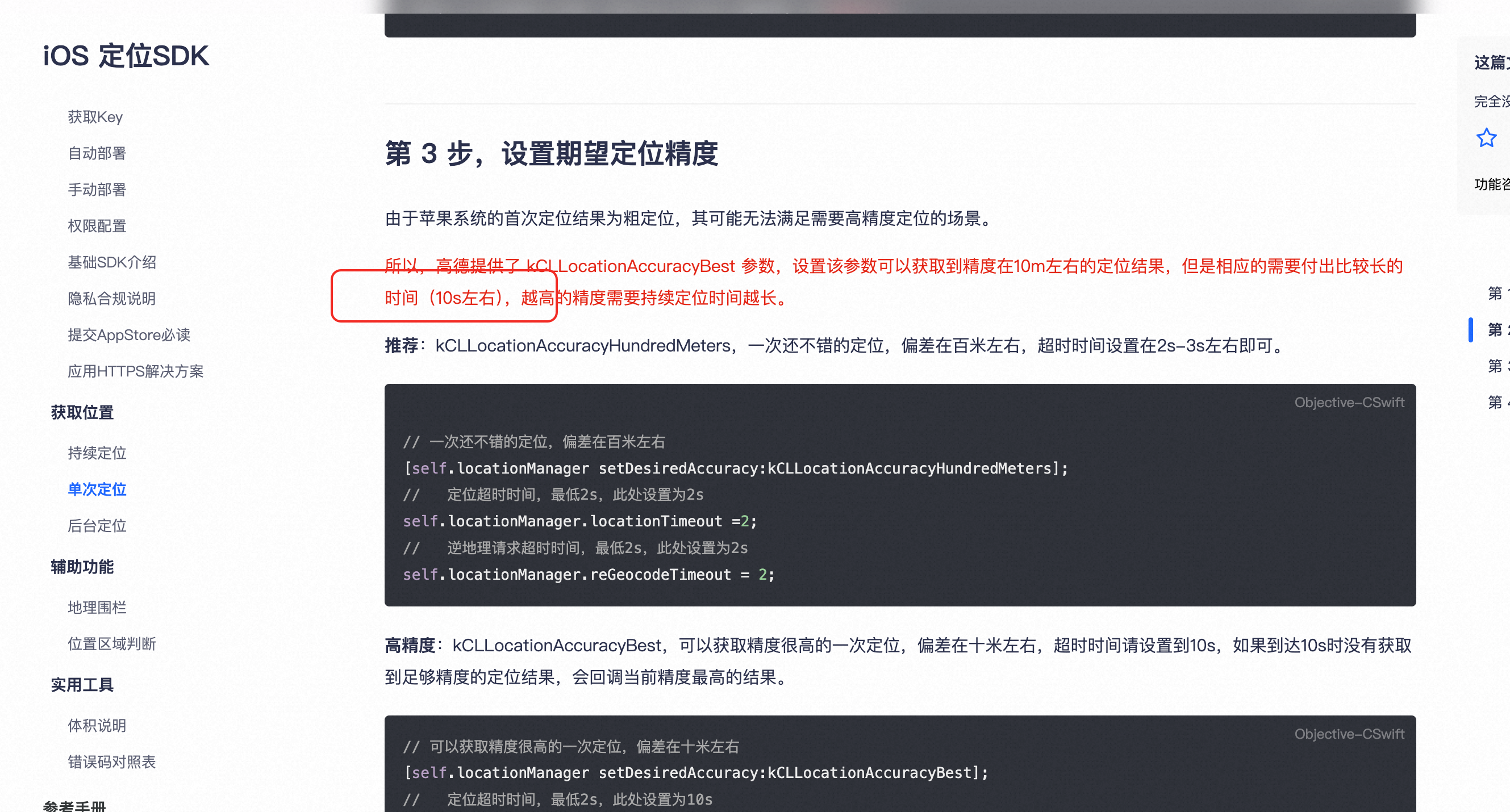
Q7: 获取定位耗时时间特别长(10s左右)
A:
best定位耗时需要10s,推荐用kCLLocationAccuracyHundredMeters
https://lbs.amap.com/api/ios-location-sdk/download
Q8: 更新导航sdk后编译报错
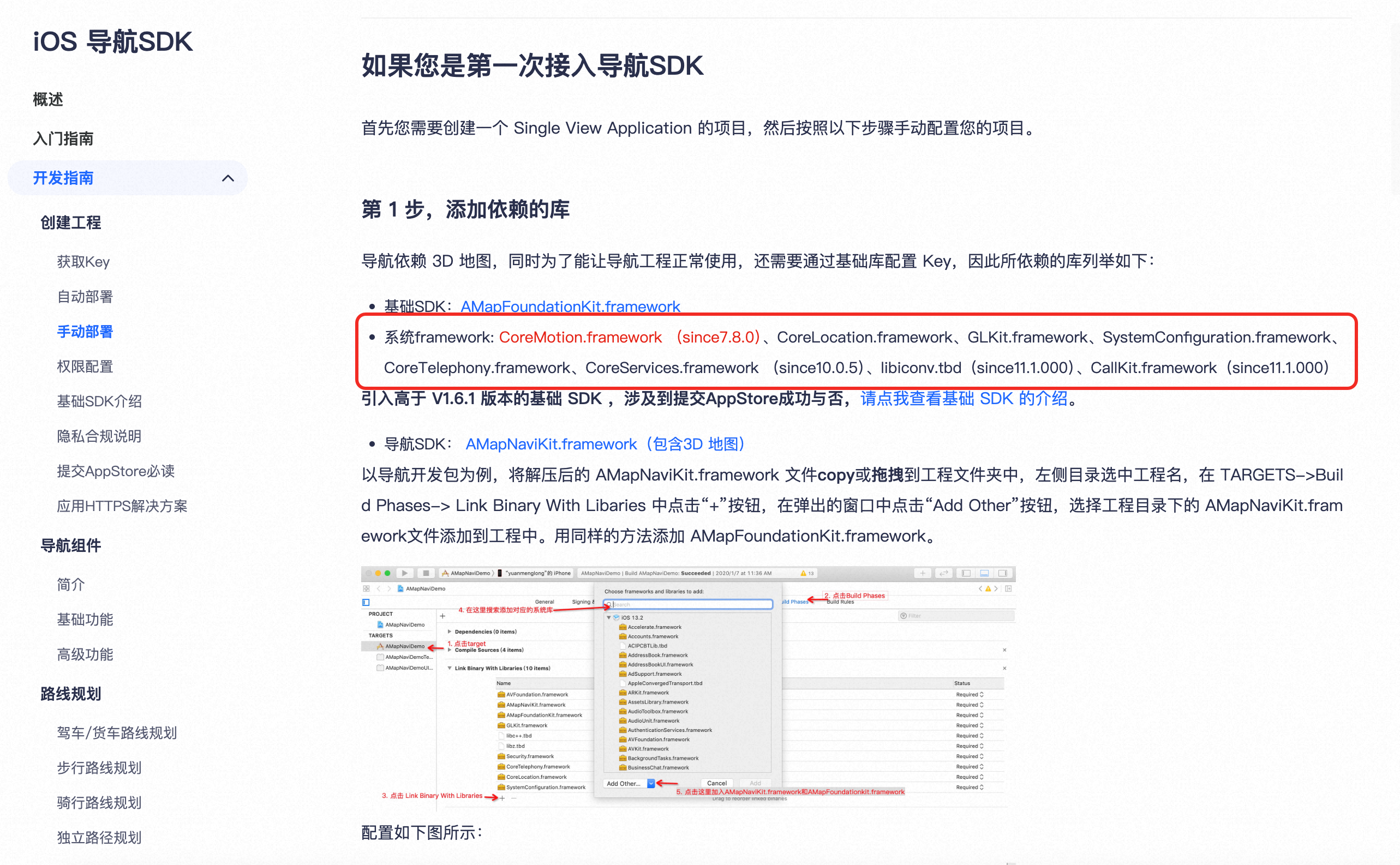
A:
需要添加系统依赖库,如Callkit等
参考文档
- 导航sdk集成官方文档:https://lbs.amap.com/api/ios-navi-sdk/summary
- 地图sdk集成官方文档:https://lbs.amap.com/api/ios-sdk/summary
技术支持
如有技术问题,请联系高德开放平台技术支持团队。