

Mass Points Overlay 最后更新时间: 2026年07月02日
Introduction
The massive point layer is designed for mobile applications to display large sets of coordinate points that share similar attributes. This layer efficiently handles point data ranging from a few dozen to 100,000 points (it is recommended not to exceed 100,000 points). This feature is supported from iOS Map SDK version 5.1.0 onwards.
The following image shows a massive point layer rendering tens of thousands of points:
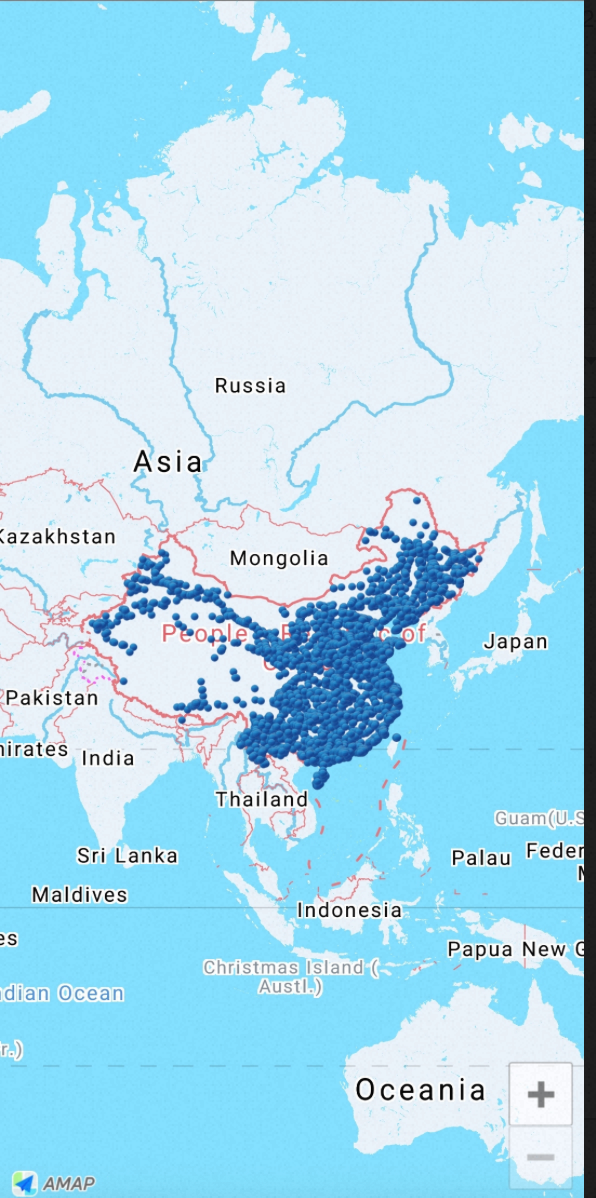
Display a Massive Point Layer
Step 1: Create a Massive Point Layer
Read the point data and create the massive point layer. The following example demonstrates this process:
/// Read latitude and longitude arrays from a file
NSString *file = [[NSBundle mainBundle] pathForResource:@"10w" ofType:@"txt"];
NSString *locationString = [NSString stringWithContentsOfFile:file encoding:NSUTF8StringEncoding error:nil];
NSArray *locations = [locationString componentsSeparatedByString:@"\n"];

/// Create a MultiPointItems array and populate it with data
NSMutableArray *items = [NSMutableArray array];

for (int i = 0; i < locations.count; ++i)
{
    @autoreleasepool {
        MAMultiPointItem *item = [[MAMultiPointItem alloc] init];

        NSArray *coordinate = [locations[i] componentsSeparatedByString:@","];

        if (coordinate.count == 2)
        {
            item.coordinate = CLLocationCoordinate2DMake([coordinate[1] floatValue], [coordinate[0] floatValue]);

            [items addObject:item];
        }
    }
}

/// Create a MAMultiPointOverlay from the items
MAMultiPointOverlay *_overlay = [[MAMultiPointOverlay alloc] initWithMultiPointItems:items];

/// Add the overlay to the map view
[self.mapView addOverlay:_overlay];
Step 2: Customize the Massive Point Layer Style
Use the renderer to customize the icon and anchor point of the massive points. The following example demonstrates this:
- (MAOverlayRenderer *)mapView:(MAMapView *)mapView rendererForOverlay:(id <MAOverlay>)overlay
{
    if ([overlay isKindOfClass:[MAMultiPointOverlay class]])
    {
        MAMultiPointOverlayRenderer * renderer = [[MAMultiPointOverlayRenderer alloc] initWithMultiPointOverlay:overlay];

        /// Set the icon
        renderer.icon = [UIImage imageNamed:@"marker_blue"];
        /// Set the anchor point
        renderer.anchor = CGPointMake(0.5, 1.0);
        renderer.delegate = self;
        return renderer;
    }

    return nil;
}
Handle Point Tap Events
The following callback is triggered when a point in the massive point layer is tapped:
- (void)multiPointOverlayRenderer:(MAMultiPointOverlayRenderer *)renderer didItemTapped:(MAMultiPointItem *)item
{
    NSLog(@"item :%@ <%f, %f>", item, item.coordinate.latitude, item.coordinate.longitude);
}